
dale
Associate III
December 24, 2016
Solved

STM32CubeMX on UHD (4K) display - clock configuration diagram too small to see

  • December 24, 2016
  • 13 replies
  • 8553 views
Posted on December 24, 2016 at 21:51

Using STM32CubeMX version 4.18.0 on Windows 10 Pro (build 1607) with an UHD (4K) display results in tiny toolbar icons and a very tiny Clock Configuration diagram.  Please see attached screen capture image.  Not that this application window is not maximized.

Is there any way to scale these images within the STM32CubeMX application so that I can see them with human eyes?

Additionally, the screen looks the same even when I drag the STM32CubeMX application to a different, lower-resolution monitor.

Any help would be appreciated.

Thanks,

Dale

#stm32cubemx
This topic has been closed for replies.
Best answer by Teemu Ikonen
Posted on September 16, 2017 at 20:06

This is my workaround on a Windows 10 laptop.

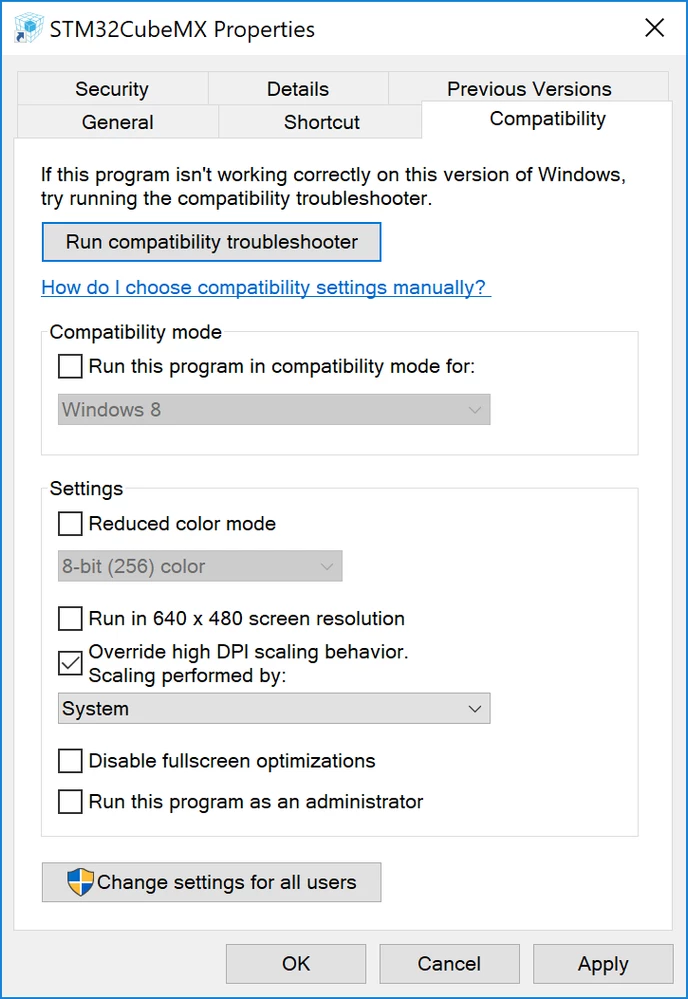
  1. Right click STM32CubeMX launcher on the desktop and select Properties
  2. Open 'Compatibility' tab
  3. Check ''Override high DPI scaling behavior'
  4. Select 'System' from the combobox and click OK.

Now CubeMX should be lot more readable on a high resolution display.

0690X00000608G7QAI.png

13 replies

Technical Moderator
December 25, 2016
Posted on December 25, 2016 at 11:22

Dear

Wheat.Dale

‌,

I will reportyour issue to our CubeMx teamfor checking and will come back to you as soon as possible.

Thank you for your contribution.

Best Regards

Imen

"When your question is answered, please close this topic by clicking ""Accept as Solution"".ThanksImen"
dale
daleAuthor
Associate III
December 25, 2016
Posted on December 25, 2016 at 12:55

Imen,

Thank you.  Do please let me know if you have an update on this issue.

Dale

Tesla DeLorean
Guru
June 1, 2017
Posted on June 01, 2017 at 01:32

They look large on a 65' UHD panel....

Tips, Buy me a coffee, or three.. PayPal VenmoUp vote any posts that you find helpful, it shows what's working..
stm32cube-t
ST Employee
January 16, 2017
Posted on January 16, 2017 at 12:02

Dear Dale,

Have you used the zoom in feature? (available from the toolbar).

Doesn't it help?

dale
daleAuthor
Associate III
January 16, 2017
Posted on January 16, 2017 at 16:01

STM32Cube-T:  Thank you for pointing me in the right direction.

The zoom function from the tool bar does help with viewing the Clock Configuration diagram, but it does not help with the microscopic tool bar icons themselves.  Just finding the 'Zoom' icon is quite tedious, almost impossible.

Helio Mendonca
Associate
February 6, 2017
Posted on February 06, 2017 at 22:19

I hope this issue can be solved soon, because on 4k resolution sreens (like in my new laptop) the font and icon sizes are unreadable!!!

It seems that STM32CubeMX do not follow Windows? design schemes where up scaling is a must.

Regards,

Helio Mendonca

0690X000006069dQAA.png
amir oruji
Visitor II
March 5, 2017
Posted on March 05, 2017 at 09:44

Hi

I have this problem too.

please help to fix this.

Willem La Grange
Associate
August 10, 2017
Posted on August 10, 2017 at 19:40

Have you tried <CTRL> + Mousewheel to Zoom in or out?

Works on my system

Adam Hamilton
Senior
August 11, 2017
Posted on August 11, 2017 at 03:14

The problem stems from the inability for the Swing API (The Java library that handles the GUI) to properly scale the controls to fit the text. While <CTRL> + Mousewheel does solve the issue to some degree, the individual elements within the clock configurator don't scale properly.

If you look at my post above, you will notice that the dividing lines for the board list don't scale properly to fit the text which makes it difficult to read. I do have a solution which works that is detailed further down. This is a rather drastic approach and consequently affects all java applications.

There might be a way to limit this workaround to just the CubeMX application by making a copy of the javaw.exe application and applying the workaround to just the copy. This copy could then be used to explicitly run the CubeMX software. I have not tried this but if I do go ahead with this and it works I will update my post further down to detail what I did.

Alex Whittemore
Visitor II
May 31, 2017
Posted on May 31, 2017 at 18:46

I'd like to just toss my hat in the ring that high density display support is important.

Tesla DeLorean
Guru
May 31, 2017
Posted on June 01, 2017 at 00:54

The scaling on CubeMX is awful, I'm really not sure why this is taking so long to fix or address. You really need someone to take ownership of the User Interface so the experience makes sense across a realistic range of platforms and displays. This means displays of assorted resolutions and aspect ratios.

Even on regular displays the initial size, scaling and fonts frequently seem non-optimal.

You can't build software that expects everyone to have a 1920x1080 display (or frankly any hard definition), when building consumer applications you have to build things that work on the hugely wide variations that the PC and MAC marketspace allows for. If this means part of the team needs a cross section of displays, and a focus of usability, then so be it.

Tips, Buy me a coffee, or three.. PayPal VenmoUp vote any posts that you find helpful, it shows what's working..
Tesla DeLorean
Guru
June 27, 2017
Posted on June 27, 2017 at 16:55

Please 'Like' the top-level question here, or 'I also have this problem/question', so the screen/size management issue gets some love from the User Interface/Experience team

Tips, Buy me a coffee, or three.. PayPal VenmoUp vote any posts that you find helpful, it shows what's working..
misagh
Associate II
June 27, 2017
Posted on June 27, 2017 at 17:35

This is really a serious problem. I hope the

CubeMX

team will fix it as soon as possible.
Michael Balaun
Visitor II
June 27, 2017
Posted on June 27, 2017 at 18:53

Same issue here. I'm on a Dell XPS 15 laptop with a 4k display, switching the display resolution to 1920x1080 does not fix the UI display problems.

Technical Moderator
June 27, 2017
Posted on June 27, 2017 at 19:21

Hello,

I will forward your issue to CubeMx team and keep you informed about the taken actions/explanation if needed.

Regards

Imen

"When your question is answered, please close this topic by clicking ""Accept as Solution"".ThanksImen"
Adam Hamilton
Senior
August 4, 2017
Posted on August 05, 2017 at 00:16

I have found a possible solution while searching the interwebs.

https://superuser.com/questions/988379/how-do-i-run-java-apps-upscaled-on-a-high-dpi-display

It is only a partial solution that would mean you will have to disable the DPI scaling for the java binary programs within the Program Files/java/bin directory  or Program Files (x86) for non 64 bit versions.

I think the problem relates to the Swing GUI library that I suspect the Cube application uses and Swing as I have found out is not DPI aware. As I am unfamiliar with Swing, I am not sure whether there is a separate scaling property in all the UI elements that it provides. If there is a property then I am sure something can be done to obtain the system scaling in use (for me it is 200%) and apply this scale factor the buggy UI elements.

This is a workaround that will affect every java GUI application.