
H.Ahmed
Associate II
October 25, 2022
Solved

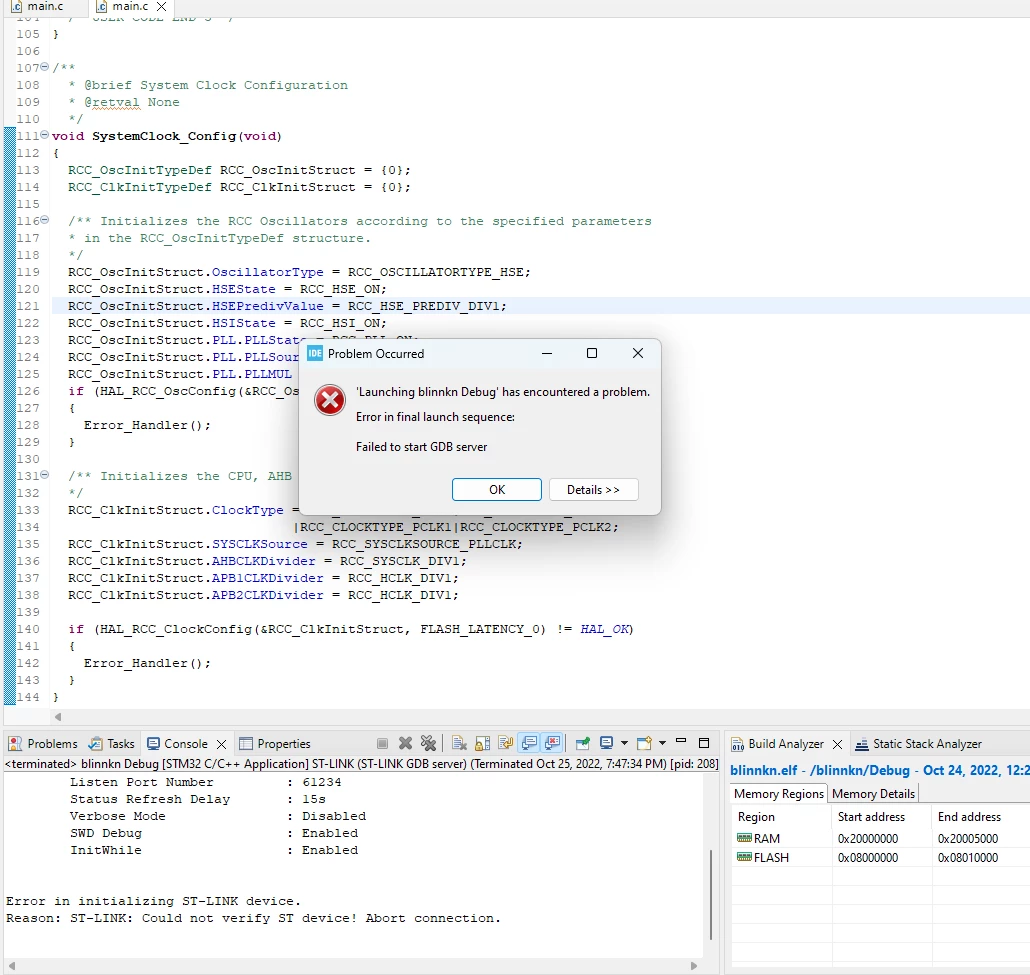
Can anyone help me solve the "failed to start GDB server" error.

  • October 25, 2022
  • 15 replies
  • 22277 views

I'm trying to program STM32F103C8T6 using CUBEIDE. After solving so many errors now I have this error " failed to start GDB server" tried different PORT NUMBERS and also changed debug prob from " OPEN OCD" to "GDB SERVER" but could not help.
0693W00000UomRtQAJ.png

This topic has been closed for replies.
Best answer by MM..1

Seems your ST-Link or MCU dont work. Checkthis all first in STLink utility or STMCubeProgrammer sw.

After work try back in debuger.

15 replies

MM..1
MM..1Answer
Chief III
October 25, 2022

Seems your ST-Link or MCU dont work. Checkthis all first in STLink utility or STMCubeProgrammer sw.

After work try back in debuger.

H.Ahmed
H.AhmedAuthor
Associate II
October 25, 2022

Yes I changed ST-LIINK and STM32F1 but could not help.

It would be tremendous if you can help me to solve this problem.

MM..1
Chief III
October 26, 2022

Explain how is connected your SWD , explain how is powered , and from your reply i have zero info if your design work with STM32CubeProg - STM32CubeProgrammer software for all STM32 - STMicroelectronics

PHolt.1
Senior
October 25, 2022

This issue has always been there. The software is just not that reliable.

I normally unplug the debugger USB cable and plug it back in and that fixes it - until next time.

The only other fix is to reboot the computer.

It is a real hassle when working remotely. After say 10 debug builds the debugger dies. So when working remotely I use a feature in my product where I upload the code (over http) and it then flashes it, so avoiding any debugger usage. But then obviously I can't "debug" by stepping.

H.Ahmed
H.AhmedAuthor
Associate II
October 25, 2022

I agree with you about the reliability of the both software and hardware.

I would be very thankful if you can help me more.

PHolt.1
Senior
October 25, 2022

Are you using a genuine ST STLINK V2 or V3?

There are many chinese counterfeits around and some don't work properly.

If you use STLINK V3 (it is better than V2) then when you connect it to a USB port you should see a "STLINK V3S" drive with a couple of files on it. You need to get this part to work first.

H.Ahmed
H.AhmedAuthor
Associate II
October 25, 2022

I'm using ST-LINK V2

H.Ahmed
H.AhmedAuthor
Associate II
October 25, 2022

I have selected debug prob to OpenOCD

Is it okay or I have to change it to ST-LINK GDB server??

because when I select OpenOCD this error occur

0693W00000Vi4pyQAB.png

mattias norlander
ST Employee
October 26, 2022

Hi,

@H.Ahmed​, the STM32F103C8T6 is an MCU which has been particularly subject to cloning by competitors. Maybe because it is embedded on the popular Bluepill board.

The debugger is here detecting that the MCU you have is not a genuine STM32 device. We will never allow non-genuine STM32 devices to be used with our tools as I hope you can understand and respect.

Out of curiosity: From where did you buy this board or MCU?

In general, the only thing I can recommend is to buy MCUs and boards from trustworthy suppliers.

@PHolt.1​, did you read the error message in the OP screenshot? Are you 100% certain that your struggle with ST-LINK debug comes from the same root-cause. I am quite skeptical. Either the device is fake, or it is not. With fake devices I assume we would deny debug 100% of the time.

Feel free to post your screenshots and log-files when you run into debug issues every ~10th launch, and maybe we can find the root-cause. I think we are mixing apples with bananas in this thread. :)

Kind regards, Mattias

H.Ahmed
H.AhmedAuthor
Associate II
October 26, 2022

I have issued my devices from my University.

Can you please tell me how to check stm32 or ST-Link is either genuine or not.

MM..1
Chief III
October 26, 2022

Explain how is connected your SWD , explain how is powered , and from your reply i have zero info if your design work with STM32CubeProg - STM32CubeProgrammer software for all STM32 - STMicroelectronics

PHolt.1
Senior
October 26, 2022

If you can tell me where the debugger log is, I will be able to post it.

Yes; my issue is intermittent whereas the OP's is probably constant, so he has another problem.

I am using 100% genuine 32F417VGT6, from UK distributors like Farnell, RS, Anglia. Of course these parts are now nonexistent but I managed to get > 500 before the world went crazy about hoarding stocks.

Many people have reported intermittent STLINK failures, fixable by unplugging the USB cable. That launch sequence error message is completely common.

mattias norlander
ST Employee
October 27, 2022

This is a problem are where we would like to improve the situation!

But it is quite hard to narrow down the problem.

For example when dealing with customer PCBs and soldered on ST-LINKs long wires may impact debug stability... Such issue is outside ST control but will still "taint" the reputation of the debugger. Important for us is to understand which percentage of errors that truly are tools related. Which debug tool is the root-cause and how can we "robustify" the debug experience.

The more you are able to share, the better. I will reply below to your console output.

PHolt.1
Senior
October 26, 2022

Here you go...

STMicroelectronics ST-LINK GDB server. Version 7.0.0
Copyright (c) 2022, STMicroelectronics. All rights reserved.
 
Starting server with the following options:
 Persistent Mode : Disabled
 Logging Level : 1
 Listen Port Number : 61234
 Status Refresh Delay : 15s
 Verbose Mode : Disabled
 SWD Debug : Enabled
 InitWhile : Enabled
 
Waiting for debugger connection...
Debugger connected
Waiting for debugger connection...
Debugger connected
Waiting for debugger connection...
 -------------------------------------------------------------------
 STM32CubeProgrammer v2.11.0 
 -------------------------------------------------------------------


Log output file: C:\Users\peter\AppData\Local\Temp\STM32CubeProgrammer_a11496.log
ST-Link Server is running on port : 7184
ST-LINK SN : 003B000E5553500D20393256
ST-LINK FW : V3J10M3B5S1
Board : STLINK-V3SET
Voltage : 3.27V
Error: ST-LINK error (DEV_TARGET_CMD_ERR)
2nd connect tentative with a lower frequency (8MHz)
ST-LINK SN : 003B000E5553500D20393256
ST-LINK FW : V3J10M3B5S1
Board : STLINK-V3SET
Voltage : 3.27V
Error: ST-LINK error (DEV_TCP_CMD_ERR)
Encountered Error when opening C:\ST\STM32CubeIDE_1.10.1\STM32CubeIDE\plugins\com.st.stm32cube.ide.mcu.externaltools.cubeprogrammer.win32_2.0.301.202207041506\tools\bin\STM32_Programmer_CLI.exe
Error in STM32CubeProgrammer
Shutting down...
Exit.

and, guess what, that .log file doesn't exist! I was working remotely so now I have another dead system and have to drive there to unplug the USB cable...

Actually this loss of the debugger happens much more often when working remotely (over Remote Desktop).

win7-64.

If I repeat (with F11) I get this

 
STMicroelectronics ST-LINK GDB server. Version 7.0.0
Copyright (c) 2022, STMicroelectronics. All rights reserved.
 
Starting server with the following options:
 Persistent Mode : Disabled
 Logging Level : 1
 Listen Port Number : 61234
 Status Refresh Delay : 15s
 Verbose Mode : Disabled
 SWD Debug : Enabled
 InitWhile : Enabled
 
Target unknown error 33
 
Error in initializing ST-LINK device.
Reason: Unknown. Please check power and cabling to target.

 Fortunately my system has a remote code load option over http which avoid using the debugger, but then of course I can't single step...

PHolt.1
Senior
October 27, 2022

For example when dealing with customer PCBs and soldered on ST-LINKs long wires may impact debug stability... Such issue is outside ST control but will still "taint" the reputation of the debugger. Important for us is to understand which percentage of errors that truly are tools related. Which debug tool is the root-cause and how can we "robustify" the debug experience.

I have tried all kinds of things over past 2 years, on several development setups, some win7-64 and some win10, some stlink v2 isol and some stlink v3 and some stlink v3 isol. All of them fail sometimes. I have tried different debugger speeds, all the way down th silly stuff like 1MHz (stlink v3 should do 24MHz, v3 isol about 8MHz). And different ITM console speeds too. Nothing really makes much difference; the USB end needs unplugging to recover the debugger.

Also a frequent issue on some systems is the debugger losing contact with the target, so you lose any breakpoints you are waiting on. Have to rebuild/reload with F11.

Re target cables, I have done all kinds. This is the shortest I can do. I am using the Olimex 20way to 10 way adapter and a very short 10 way cable (out of the STLINK cable set) and you can see how close the CPU is.

0693W00000VOHCVQA5.png 

If I plug that 10 way cable directly into the 10 way socket in the debugger, it works but much less reliably than using the 20 way socket on the debugger.

More posted here a while ago

https://www.eevblog.com/forum/microcontrollers/10-pin-debug-connector-and-stlink-v3-isol-not-reliable/msg3564782/#msg3564782